WebForms Core
Server-Orchestrated UI Technology
WebForms Core is a server-orchestrated UI technology for building interactive HTML applications without a separate front-end framework. It was introduced by Elanat in 2024.
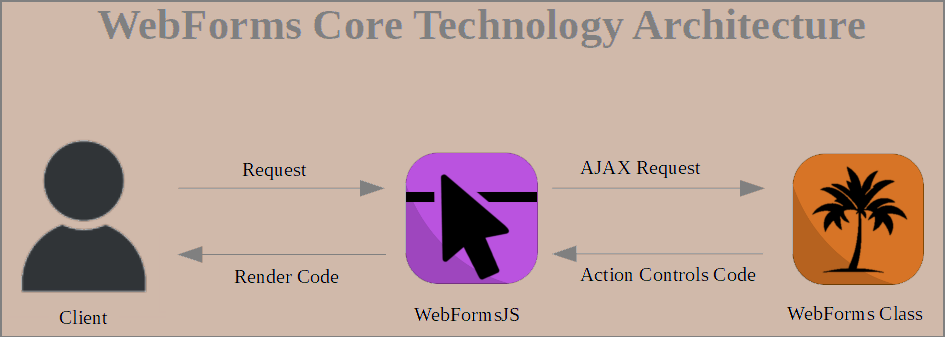
WebForms Core connects server-side application logic to the HTML DOM through a command-based architecture. The WebForms class acts as the Commander on the server, creating UI commands and workflows. WebFormsJS acts as the Executor in the browser, interpreting these commands and applying them to the HTML DOM.
The core architecture is simple:
Server → WebForms → Commands → WebFormsJS → HTML DOM
Commands can control HTML elements, modify content and attributes, manage events, execute UI workflows and coordinate browser-side operations. The same architecture can also work with JavaScript and WebAssembly, allowing server-side and browser-side execution to participate in one unified UI model.
One UI Model Across Programming Languages
WebForms Class for Your Back-End
WebForms Core brings the same UI command model to different programming languages and back-end environments. The WebForms class has been implemented for multiple languages, allowing developers to build WebForms Core applications with the technologies they already use on the server.
WebForms Core implementations are available for C#, Python, Java, PHP, Ruby, Swift, Elixir, Node.js, Go, Rust, AssemblyScript and other web-oriented environments.
The syntax of the WebForms class follows the conventions and capabilities of each language, while the underlying WebForms Core architecture remains consistent. The back-end creates commands, WebFormsJS executes them, and the HTML DOM becomes the active UI surface.
Server-Orchestrated Command Architecture
When a View is initially requested, the server returns a normal HTML document. WebFormsJS runs in the browser as the WebForms Core runtime and interprets WebForms Core instructions contained in the page.
When the user interacts with the interface, WebFormsJS can send a request to the server. The WebForms class processes the request and creates a response containing Action Controls. These commands are returned to WebFormsJS, which interprets them and executes the requested operations on the HTML DOM.
The server therefore does not need to return a complete HTML page for every UI change. It can return a compact sequence of commands that describes what should happen to the existing interface.
WebFormsJS can also execute operations locally in the browser. As a result, WebForms Core can combine server-side orchestration with client-side execution while preserving a single command architecture.
Event-Driven UI
HTML Events as UI Triggers
WebForms Core provides an event-driven structure for connecting HTML events with server-side logic and browser-side execution. Events such as click, keyup, mouseover, drag and drop can be used as triggers for WebForms Core workflows.
An event can initiate a server request, execute server-side application logic and produce a sequence of UI commands. WebFormsJS then executes those commands against the current HTML DOM.
Interactions that do not require the server can also be executed locally by WebFormsJS. This makes it possible to combine server workflows, local DOM operations, JavaScript and WebAssembly within the same application architecture.
Put the UI Logic Where Your Application Logic Lives.
How to Use WebForms Core
Just Copy
Getting started with WebForms Core is simple. You do not need a separate front-end project or a component build system. Add WebFormsJS to your HTML page and add the WebForms class for your preferred back-end language.
Step 1: Download WebFormsJS and add the library to the head section of your HTML page.
Download WebFormsJS
Step 2: Get the WebForms class for your programming language and add it to your back-end project.
Get WebForms Classes
Step 3: Create your UI logic with the WebForms class and let WebFormsJS execute the resulting commands in the browser.
